

Refund Transactions
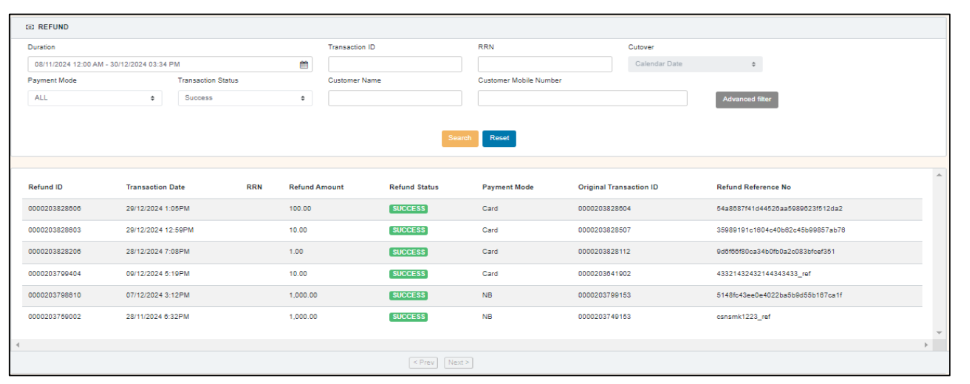
What it shows: Refund listing / detail for last 6 months, status (Success, Pending, Failed) and ability to view original sale.
a) Fetch refunds- Same as sale filters (date range, transaction ID, RRN, Payment Mode, Status, Customer)
b) View refund details fields- Refund ID, Type, Status, Response Code, Original Txn ID, Merchant Ref No, Merchant ID, Refund Amount, Remaining Amount, Created By / Approved By / Approve At, Customer details, Additional Params, Currency/Country code.
c) View history — show lifecycle, timestamps & actors.
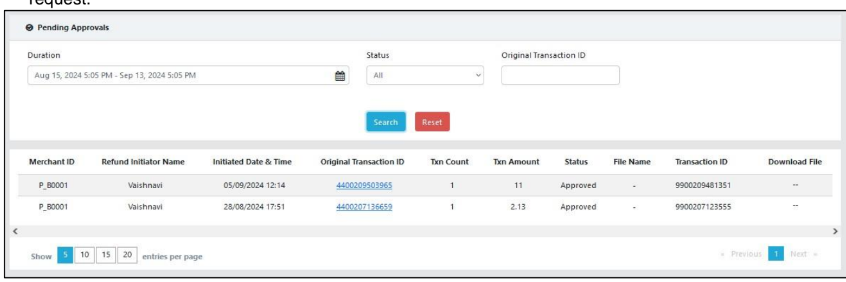
d) Maker-Checker (bulk & single refunds) — maker uploads or initiates refund; checker approves/declines from Pending Approval screen. Approver can view original transaction details before approving. Notifications are emailed on rejection/approval.
Updated 8 months ago