

Manage Chargebacks
Track, act on, and upload proofs for chargebacks / pre-arbitration / arbitration; track history and automatic emails & reminders.
Key concepts & statuses
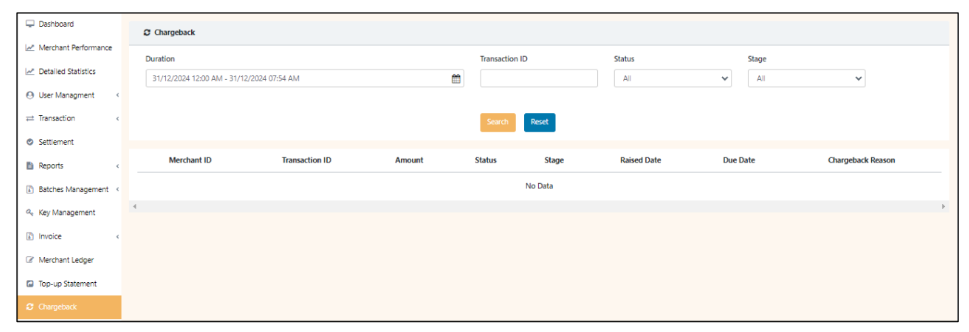
Statuses: Chargeback, Pre-arbitration, Arbitration.
Stages: Open, Accept, Under Review (when merchant uploads proof), Submitted, Resubmit, Additional Doc, Reopen, Force Accept, Failed.
Step-by-step (responding to a chargeback)
- Merchant receives email notification with chargeback details & due date.
- Open Chargeback tab → search by Transaction ID / Date range (past 6 months).
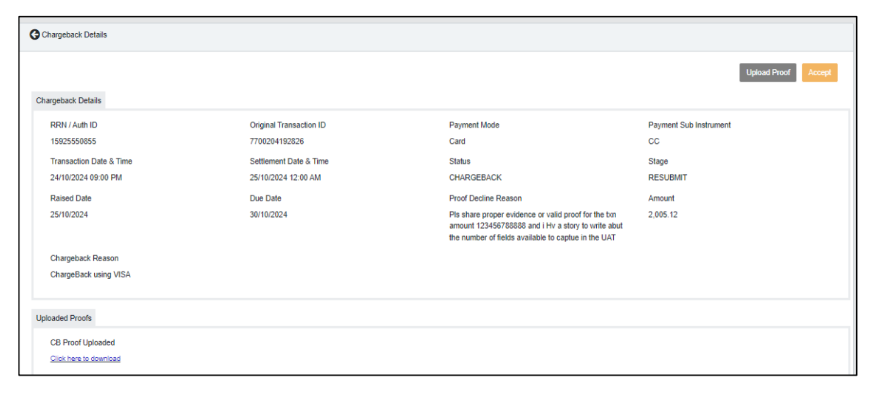
- Click entry → review details (Amount, Stage, Raised Date, Due Date, Reason).
- Accept (if merchant concedes) or Upload Proof (pdf/jpeg). If uploading proof, JioPay Ops reviews and submits to acquirer.
- If proof is invalid → stage becomes Resubmit or Additional Doc → upload corrected evidence.
- If no action → Chargeback may be Force Accepted at TAT expiry.
Show history — use Show History in detailed Pre-Arbitration/Arbitration views to view full lifecycle (timestamps & downloadable proof).
Email alerts — JioPay sends emails for CB raised, accepted, proof submitted, reopened, proof invalid/insufficient, force accepted, rejected, and 24-hour TAT reminders.
Updated 8 months ago
Did this page help you?