

Identity checks
The four checks every owner and signatory completes.
Before you start
Have your PAN card, mobile number, a clear photo, and your offline Aadhaar ZIP with its 4-digit share code. You download the ZIP from the UIDAI website and set the share code yourself.
Steps
| Check | What to do |
|---|---|
| PAN Card | Upload your PAN card. If a name is shown, select Yes, this is mine. |
| Contact Details | Enter your 10-digit mobile number, then Save & Complete. |
| Photo | Upload a clear photo, or take one with your camera. |
| Aadhaar | Select Open Aadhaar e-KYC Guide & Upload. Upload your offline ZIP, type the 4-digit share code, then Verify Aadhaar. |
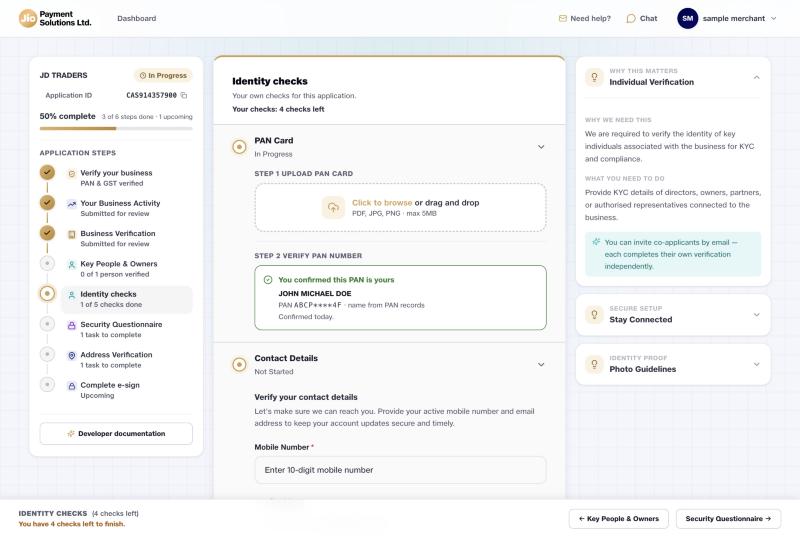
For Aadhaar you will see your details and Name match: Yes. Select Done.

When all four are done, select Submit for review.
If your business is a…
Sole proprietor
Only you do these checks, and you submit them yourself.
Company, LLP, partnership, trust or society
Each owner and signatory does their own checks from their email link. See If you were invited. Whoever finishes last selects Submit for review, and it sends everyone's checks together.
Good to know
- While the section is under review you cannot add or remove people.
- The footer tells you who is still working, for example "ANANYA AGARWAL has 5 checks left".
Updated 15 days ago
Did this page help you?